
Click Open Attached Reconciliation to open the Recon main screen:
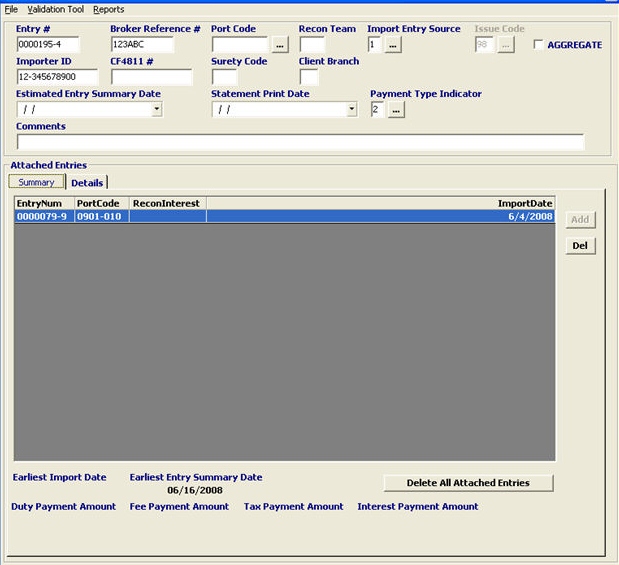
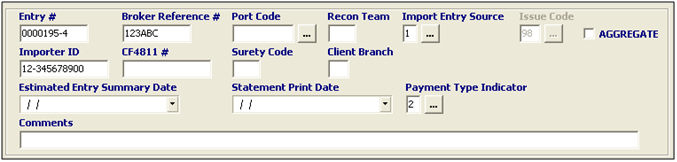
First, we must enter the appropriate entry information for this reconciliation entry
|
Field/Button/Tab |
Status |
Description |
|
Entry Number |
Mandatory |
Enter the entry number to be used on this reconciliation entry. |
|
Broker Reference # |
Optional |
Enter the broker reference number. This is the number that identifies the shipment for the broker. |
|
Port Code |
Mandatory |
The location that the reconciliation transaction is being initiated. Choose the correct port for this entry, or click the ellipsis and choose the location from the pick-list. This can be set to default from the profile, but this must be the recon port where the importer applied for recon. |
|
Recon Team |
Mandatory |
Enter the valid CBP Recon team at the port. This will default based on the port selection. |
|
Import Entry Source |
Mandatory |
Enter the import entry source code, or choose from the pick-list by clicking the ellipsis. This code indicates where the entry(s) were initially filed. This will default to 1. |
|
Issue Code |
Conditional |
Enter the issue code, or choose from the pick-list by clicking the ellipsis. This may auto-fill from the selected entry. This code indicates the type of issue for which the reconciliation is being filed. |
|
AGGREGATE |
Checkbox |
Check this box to indicate that this reconciliation is aggregate. This means that the transmission will send as one reconciliation, rather than a separate transmission for each entry. |
|
Importer ID |
Mandatory |
Enter the importer ID for this reconciliation entry. |
|
CF4811 # |
Optional |
Enter the CF-4811 ID number for this reconciliation entry (if applicable) |
|
Surety Code |
Mandatory |
Enter the surety code of the bond that was used in the underlying entries. |
|
Client Branch |
Optional |
Enter the client branch data (if applicable) |
|
Estimated Entry Summary Date |
Mandatory |
Enter the estimated entry summary date, or choose from the calendar by clicking the drop-down. |
|
Statement Print Date |
Conditional |
Enter the statement print date for these reconciliation entries. The statement print date should be filled in UNLESS your are not authorized for batch payment. |
|
Payment Type Indicator |
Mandatory |
Enter the payment type for this ACH transaction, or choose from the pick-list by clicking the ellipsis. |
|
Comments |
Mandatory |
Enter any comments in this free text field. These comments are used to describe additional information associated with this reconciliation. |
Click the Add button to add the entries that will be attached to this reconciliation:
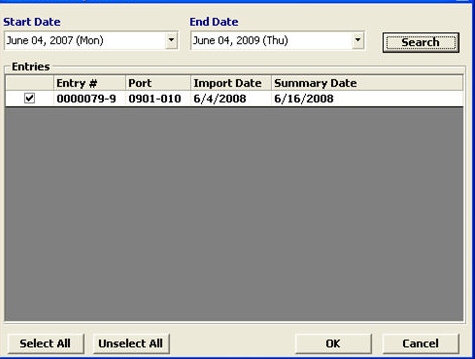
Enter the date range (start/end date) and select the desired entry(s)
You can remove attached entries by clicking the Del button or Delete All Attached Entries

Double click the desired data field to edit this information (New TarNum, New Qty, New SPI, or New Value)
You can also click on Batch Change to edit the data on multiple lines/entries
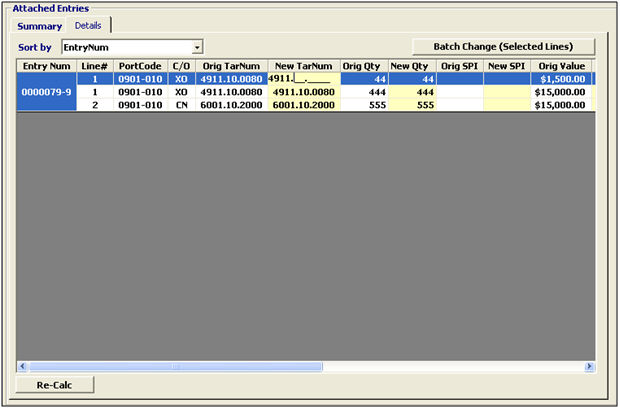
Once you've made the necessary change, click the Re-Calc button to re-calculate your entry information
You won't be able to save your reconciliation entry until this Re-Calc function is performed
Now that you've completed your reconciliation entry data, you are now ready to move on to Completing a Recon Transaction